

OpenFTPUpdater-AI
The website, kept in step with your releases.
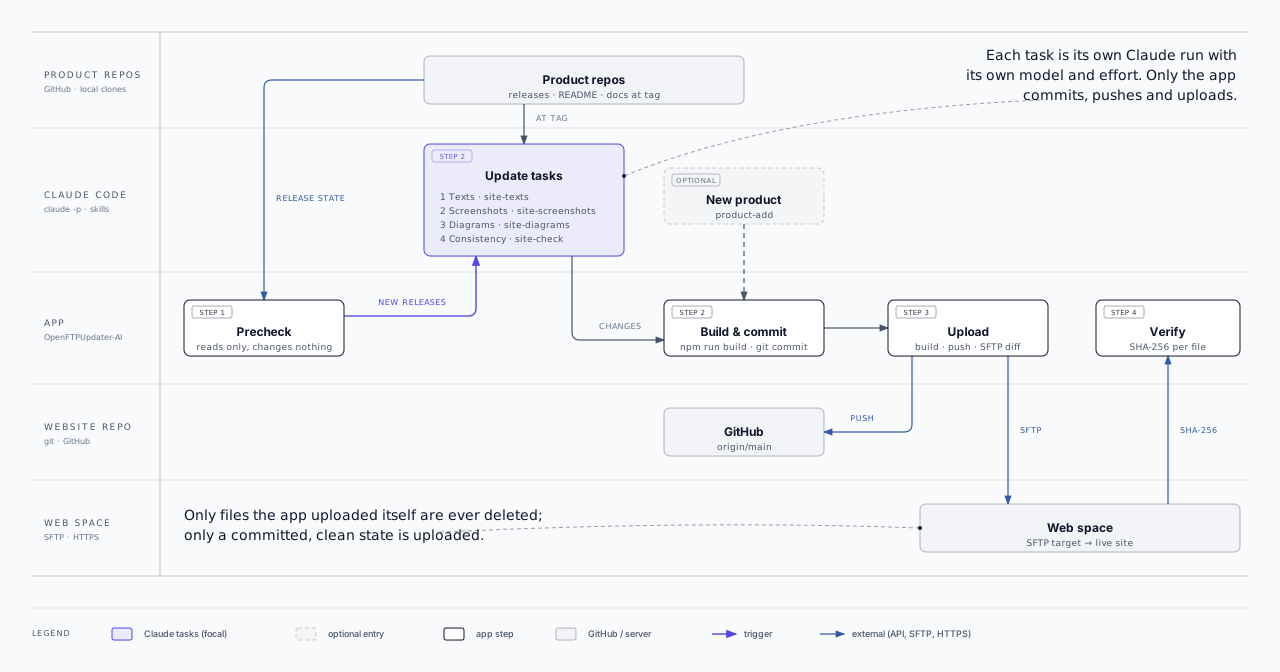
OpenFTPUpdater-AI keeps a static website in step with the releases of the products it describes, and publishes it. Four buttons, run one by one or all in a row: Precheck checks the project, tools and server without changing anything. Update lets Claude Code update the content for the outdated products and commits. Upload builds fresh, pushes and uploads only new or changed files via SFTP. Verify downloads every uploaded file from the live site and compares it with the build via SHA-256.
Claude Code runs headless in the project folder and may only read git and edit files in the project; committing, pushing and uploading remain the app's job. The actual know-how lives in the website project's skills — where the texts are, how screenshots are made, what must never be claimed. The password or passphrase lives in the system keychain, never in a file. Only a committed, clean working tree is uploaded, and the app deletes only files on the server that it uploaded itself.
How it works
Features
- Four steps as buttons: Precheck, Update, Upload, Verify — one by one or all in a row
- Precheck checks the project file, tools (git, node, npm, claude, gh), a clean working tree and remote state, the latest GitHub release of every watched product against the documented one, SFTP login, target folder, live site and last upload — without changing anything
- Update: git pull --ff-only, then Claude Code runs headless in the project with the project's skill and the list of outdated products, followed by a build and one commit
- Update tasks as checkboxes, each its own Claude Code session with its own skill, model and effort, in a fixed order; the app commits once at the end
- Product selection via checkboxes in the main window: Precheck skips deselected products, and Update names them to Claude Code as "not selected, leave unchanged"; the selection lives in the app's settings
- New product: pick a GitHub repository and Claude Code adds it with the project's addProductSkill (product page, listings, icon, diagram, site.json entry)
- Repository selection through the signed-in gh CLI, private repositories included, marked for local clone, already on the site and website repository; without gh, the public repositories of the known owners
- Upload sends only new or changed files via SFTP, assets before pages, each under a temporary name and then renamed, so visitors never get half-written files; files removed from the build are deleted on the server
- It deletes only files it uploaded itself; other files on the server stay untouched. Only a committed, clean working tree that is not behind origin is uploaded
- Verify downloads every file of the last upload from the live site and compares SHA-256 with the build
- Claude Code runs with acceptEdits; everything outside the allowlist is denied — git is read-only, with no writes to other repositories. Always denied: git push, git commit, git reset, git checkout, rm -rf
- The password or key passphrase lives in the system keychain, never in a file; SSH keys are supported. The server host key is confirmed once
- macOS app (Tauri), installed as a PKG, individually or via Microsoft Intune; the code is cross-platform, Windows is untested
- Self-update: at start and via "Nach Updates suchen", the app checks the latest GitHub release of this repository, shows a banner for a newer version and installs only after verifying the SHA-256 sum GitHub publishes; betas only on request, development builds don't check

Write to me
Whether you have product feedback or want to discuss working together, your message comes straight to me. I reply myself.